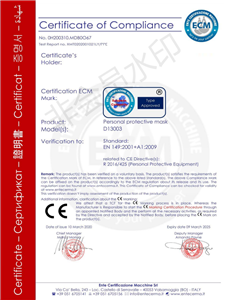
KN95 respirator mask CE compliance certificate issued by ECM, certified to EN 149-2001+A1:2009

What Artwork Specs Ensure Smooth KN95 Custom Logo Packaging?

Artwork specifications directly determine whether custom KN95 mask packaging arrives on time and as designed. This guide covers file formats, bleed zones, Pantone matching, compliance labeling, proofing, and common mistakes that delay production.

Why Artwork Specifications Matter for KN95 Mask Custom Logo Projects

When you order a kn95 mask custom logo, the artwork file you submit directly determines whether your packaging arrives on time, within budget, and looking exactly as designed. Buyers often assume any high-resolution image will work, only to face delays, extra charges, or misaligned prints. This article clarifies the exact artwork requirements for custom branded KN95 packaging, helping you avoid costly revisions and ensuring your supplier can execute your design flawlessly.

Critical Artwork Dimensions and Resolution for KN95 Mask Packaging

File Format Requirements

Most suppliers accept vector-based formats like Adobe Illustrator (.ai), Encapsulated PostScript (.eps), or Scalable Vector Graphics (.svg). Vector files maintain crisp edges at any size, which is essential for small text or fine logo details on mask packaging. If you only have a raster image (e.g., JPEG or PNG), ensure it is at least 300 DPI (dots per inch) at the final print size.

Bleed and Safe Zone

Bleed is the area beyond the trim line that prevents white edges after cutting. For KN95 mask packaging, a 3 mm bleed on all sides is standard. The safe zone (where critical text and your logo must stay) should be at least 5 mm inside the trim line.

Color Mode and Pantone Matching

Always submit artwork in CMYK color mode, not RGB. For consistent brand colors, specify Pantone Matching System (PMS) numbers. Without this, the printer will approximate colors, which can vary between production runs. Ask your supplier for a color proof before mass production.

Common Artwork Mistakes That Delay KN95 Mask Custom Logo Orders

Using Embedded Fonts Instead of Outlines

When you submit an .ai or .eps file, convert all text to outlines. This ensures the font appears exactly as you designed, even if the supplier does not have that font installed.

Neglecting Label Compliance Elements

KN95 mask packaging often requires specific text: "KN95," lot number, expiration date, manufacturer details, and usage instructions. Your artwork must include these elements in the correct positions and sizes as per your target market's regulations. For example, CE-marked products must display the CE mark and notified body number.body number.

Overcomplicating the Design

Elaborate gradients, drop shadows, or fine lines may not reproduce well on mask packaging materials. Stick to solid colors and simple shapes for the best print fidelity.

How to Prepare Your Artwork File for Submission

  1. Confirm file format with your supplier. Most prefer .ai, .eps, .pdf, or .cdr.
  2. Set dimensions to the exact packaging size plus 3 mm bleed.
  3. Convert all text to outlines to avoid font issues.
  4. Embed all images or provide them separately at 300 DPI.
  5. Specify Pantone colors for brand consistency.
  6. Include a mockup showing where the kn95 mask custom logo appears on the packaging.
  7. Add a notes layer with instructions for the printer.

Requesting a Proof

Always ask for a digital proof (PDF) and, if possible, a physical proof (printed sample) before mass production. Review the proof for correct spelling of all text, logo alignment and size, color accuracy, and bleed and trim lines.

Industry Scenarios Where Artwork Specs Save Your Project

Scenario 1: Emergency Order for a Trade Show

You need 10,000 custom branded KN95 masks with packaging in two weeks. By submitting a properly formatted .eps file with outlines and Pantone colors, you skip the back-and-forth correction cycle.

Scenario 2: Multi-Market Compliance

You sell masks in the U.S., EU, and Southeast Asia. Each market has different labeling requirements. Your artwork file includes separate layers for each region's text, with the logo in the same position across all versions.ons.

Scenario 3: Brand Refresh

Your company updates its logo and color palette. You send the new vector artwork with updated Pantone codes. The supplier matches the new colors exactly, ensuring consistency.

Frequently Asked Questions About KN95 Mask Custom Logo Artwork

Q: Can I use a JPEG for my KN95 mask custom logo?
A: Yes, but only if it is at least 300 DPI at the final print size. Vector formats are strongly preferred for sharpness.

Q: What is the standard bleed for KN95 mask packaging?
A: Typically 3 mm on all sides. Confirm with your supplier.

Q: How do I ensure my logo color matches across different packaging materials?
A: Provide Pantone codes and request a physical proof on the actual material.

Q: What if my artwork has multiple languages?
A: Include each language as a separate layer or file, clearly labeled.

Q: Do I need to include barcodes in the artwork?
A: If your product requires a UPC or EAN barcode for retail, yes. Provide the barcode as a vector file.

Final Checklist Before Sending Your Artwork

  • File format matches supplier's requirementsents
  • Dimensions include 3 mm bleed
  • Text converted to outlines
  • Images embedded or provided at 300 DPI
  • Pantone colors specified
  • Regulatory text included and verified
  • Mockup attached for reference
  • Proof requested (digital and physical)

Ready to Place Your Order?

Now that you understand the artwork specifications for custom branded KN95 packaging, you can submit a file that meets your supplier's requirements without delays. Contact your preferred supplier today to confirm their exact file format, bleed, and color standards.rds.

Get in Touch

准备好采购认证PPE了吗?

告诉我们您的产品需求、数量和目标市场 — 我们将在24小时内回复详细的报价和样品方案。

Order Card